Tool comparison
Best AI tools for Whop clipping in 2026
There is no single best AI tool for Whop clipping. The right choice depends on where the campaign footage comes from, how many hours you process each month and how much editing each brief requires. This guide compares the tools clippers use most, explains what matters specifically for paid-per-view campaigns and works through what each approved clip actually costs. Scribix is our product; we say where it fits and where another tool is a better choice.
The short answer
If you want the most established automatic moment detection and a virality score, start with OpusClip. If campaign footage arrives as Google Drive or Dropbox links, or you want to cut clips from inside Claude, try Scribix. If you process long sources or work in a team, look at Vizard. If you clip many short sources and want a low fixed price per video, compare Ssemble. If your clips are already cut and you only need polished captions, Submagic is built for that, and CapCut remains the free baseline for manual fixes.
Whichever tool you choose, it only finds and drafts clips. The campaign owner approves or rejects each post against the brief, so plan time to review every clip yourself.
What matters for Whop clipping specifically
Generic "best clipping tool" lists rank features. Whop clipping changes the priorities because you are paid only for approved views, at a rate per 1,000 views, often within a minimum and maximum payout per video.
Quick comparison
The table summarises how each tool charges and what you can try for free. Entry prices use monthly billing; most vendors discount annual plans.
| Tool | How it charges | Paid plans from | Free option | Best for Whop clippers who |
|---|---|---|---|---|
| Scribix (our tool) | Minutes of source footage | $29/month for 600 minutes | 60 minutes once per account; editing on paid plans | receive footage as Drive or Dropbox links, or want to clip from Claude |
| OpusClip | Credits: 1 per minute of source footage | $15/month for 150 credits | 60 credits a month, watermarked, no editor | want strong automatic moment detection and a virality score |
| Vizard | Credits: 1 per minute of source footage | $29/month Creator ($14.50/month billed yearly) | 60 credits a month, 720p export, watermarked | process long sources or work in a team |
| Ssemble | Video credits | $15/month Pro ($6/month billed yearly) | No free plan listed | clip many sources and want a low price per video |
| Submagic | Videos per month; Magic Clips is an add-on | $19/month; Magic Clips add-on $19/month for 10 uploads | Free trial | need polished captions on clips they have already chosen |
| CapCut | Free editor with a paid Pro tier | Varies by region | Free tier | fix and fine-tune clips by hand |
| ClipRadar | AI clips per month | $25/month for 56 AI clips | 7 AI clips a month | want campaign discovery and clipping in one place |
Scribix
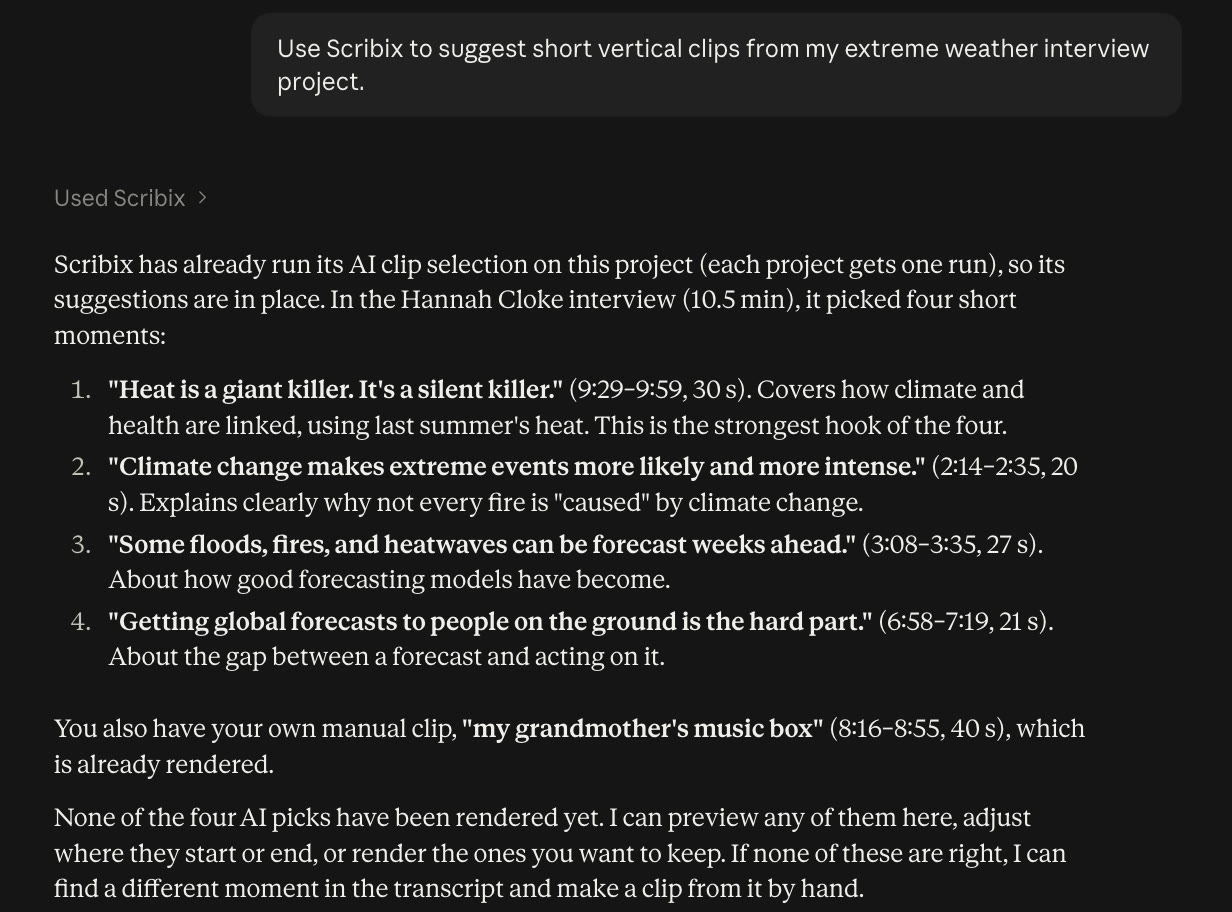
Scribix is our own tool, so weigh this section accordingly. It turns a long recording into suggested vertical clips: the AI reads the transcript of the whole video, proposes candidates with titles and source time ranges, follows the speaker in a 9:16 frame and adds captions.
For Whop campaigns, the most useful parts are imports and control. You can paste a shared Google Drive or Dropbox link, or a direct file link, instead of downloading a large file and uploading it again. On paid plans you adjust each clip's start and end against the transcript, correct captions and change the framing, which helps when a brief requires a particular moment or brand mention. You can also run the same workflow from Claude through the Scribix connector.
Limits: Scribix does not download videos from YouTube or other streaming sites, so you need the original file or a cloud link. It charges by minutes of source footage, so long recordings use more of your allowance even if you keep only two clips. Output is 9:16 only. Free accounts get 60 processing minutes once and can export AI clips as they are; editing requires Starter ($29/month, 600 minutes) or Pro ($69/month, 1,800 minutes).
OpusClip
OpusClip is the tool most often recommended for clipping, and the one two of the three AI assistants we asked named first for Whop clipping. It finds moments automatically, scores each clip with a virality score, reframes to vertical and adds animated captions. Pro adds features such as AI B-roll, several aspect ratios and social scheduling.
It charges one credit per minute of imported video, regardless of how many clips you keep. Starter is $15/month for 150 credits and is sold on monthly billing only; Pro is $29/month for 300 credits, or $14.50/month billed yearly. The free plan gives 60 credits a month with watermarked clips and no editor, which makes it a trial rather than a way to produce campaign clips.
Treat the virality score as a hint. It does not know a campaign's brief, so a high-scoring clip can still break its rules.
Vizard
Vizard also turns long videos into clips with captions and vertical framing, and it puts more weight on team workflows: the Business plan adds a shared workspace, team seats, project sharing and a brand kit. That is useful if several clippers work on the same campaigns.
Pricing is per minute of video: one credit equals one minute. Creator is $29/month, or $14.50/month billed yearly with 7,200 credits a year. The free plan includes 60 credits a month and access to the editor, but exports are 720p, watermarked and stored for three days, so it is best used to test the workflow.
Ssemble
Ssemble argues for a different pricing model: video credits instead of minutes. Its pricing page lists AI clipping at one credit per video of up to 20 minutes. The Pro plan is $15/month on monthly billing, or $6/month billed yearly with 360 credits a year, and credits do not roll over.
This can work out cheaper if you clip many short sources. For hour-long podcasts, check how longer videos are counted before you compare it with per-minute tools. We did not find a free plan on its pricing page.
Submagic
Submagic is known for caption styling: animated captions, emojis, zooms and other effects that make short clips feel produced. Its main plans count videos per month and limit their length: Starter is $19/month for 15 videos up to 2 minutes, and Business is $69/month for 100 videos up to 30 minutes.
Long-video clipping is a separate Magic Clips add-on, listed at $19/month for 10 uploads. It is a good fit when you already know which moments to post and want them to look polished, and a poorer fit as the only tool for turning hours of footage into clips. Check whether heavy caption effects suit the campaign's style before you use them.
CapCut
CapCut is a general video editor rather than an AI clipping tool, and many clippers use it to finish clips another tool found. It handles trimming, captions, text and vertical framing manually, with a free tier and a paid Pro tier whose price varies by region.
Use it as the baseline: if an AI tool's output still needs heavy manual work in CapCut, its subscription is saving you less time than it claims. Avoid adding music or templates the campaign does not allow.
Campaign-specific tools
A newer group of tools is built around clipping campaigns themselves. ClipRadar, for example, lists live campaigns from several platforms, including Whop, ranks them by rate and says its AI cuts clips to each campaign's rules. Its free plan includes 7 AI clips a month, and Clipper is $25/month for 56 AI clips.
Some sellers on Whop also offer AI clipping subscriptions aimed at Content Rewards. These tools are newer and have less public review history than general clipping tools, so test them on one campaign before committing to an annual plan.
Hands-on: one source video in Scribix
We only tested Scribix for this guide; information about the other tools comes from their own websites. On October 4, 2026, we imported a 10 minute 27 second interview released under a CC BY licence. Scribix suggested four clips, each with a title, a source time range and a fit score between 81% and 94%. We reviewed them, exported one as a 40-second vertical clip with captions and checked the downloaded file.
A single short source is not a benchmark. On a real campaign, measure how many of a tool's suggestions you would actually post, and how many of those get approved, before you pay for a year. The full workflow, with screenshots and the exported clip, is in our step-by-step Whop clipping guide.
What one approved clip costs
A fair comparison starts from your workload. Suppose you clip four 60-minute episodes a month, 240 minutes of source footage in total.
With per-minute pricing, Scribix Starter ($29/month, 600 minutes) covers that volume. OpusClip Starter's 150 credits do not, so you would need Pro at $29/month for 300 credits. Vizard Creator starts at $29/month on monthly billing. With per-video pricing such as Ssemble, the cost depends on how its credits count hour-long videos rather than on minutes.
Now divide by approved clips, not generated ones. If those four episodes give you 30 candidates, you post 15 and the campaign approves 8, a $29 plan costs about $3.63 per approved clip. At $1 per 1,000 views, each approved clip needs about 3,600 views just to cover the tool. Earn a higher approval rate, or choose campaigns with better rates, before you upgrade to a bigger plan. These figures are an illustration, not typical results.
How to choose
Run the same campaign footage through two tools' free options before paying, then follow these rules.
Frequently asked questions
Quick answers about choosing an AI tool for Whop Content Rewards.
What is the best AI tool for Whop clipping?
It depends on your footage and volume. OpusClip is the most established for automatic moment detection, Vizard suits long sources and teams, Ssemble offers per-video pricing, Submagic focuses on caption polish and Scribix fits footage shared as Drive or Dropbox links and clipping from Claude. Compare them by cost per approved clip.
Is OpusClip good for Whop clipping?
Yes, it is a strong general choice for finding moments quickly. Its free plan is watermarked and has no editor, and its virality score does not know a campaign's rules, so review each clip against the brief and budget for a paid plan.
Is there a free AI tool for Whop clipping?
Several tools have free options: OpusClip and Vizard give 60 credits a month, ClipRadar gives 7 AI clips a month and Scribix gives 60 minutes once per account. Free exports may be watermarked, lower resolution or unedited, so check them against the campaign's requirements before posting.
Can AI clips get rejected on Whop?
Yes. Campaign owners review every submission against their requirements, and some reject low-effort or obviously AI-generated clips. Using AI is usually fine; posting clips you have not checked against the brief is not.
Do I still need to edit AI clips?
Usually. Expect to adjust where clips start and end, correct names and brand names in captions and check the vertical framing. The tools save the most time on finding moments in long footage.
Can these tools clip YouTube videos for Whop campaigns?
Some tools accept YouTube links; Scribix does not download from YouTube or other streaming sites. Whatever the tool, only use footage the campaign allows you to clip, and prefer the original files when the campaign provides them.
Next step: Make and review a podcast clip with Scribix.